Automations with routers and loops.
An automation starts from a trigger and runs a series of steps. Reminders, alerts, prepared invoices and messages go out on their own, and every run can be reviewed.
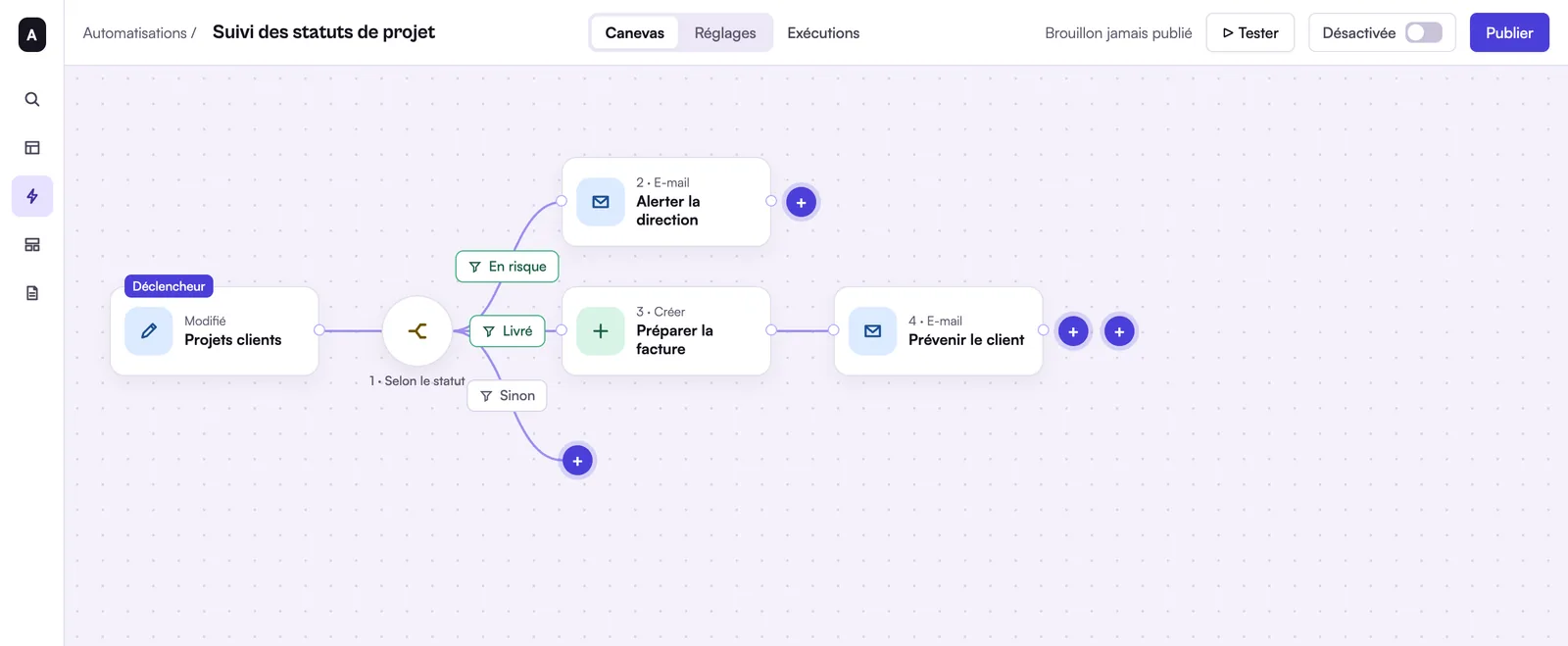
What can Rangee automations do?
A Rangee automation starts from a trigger and runs a chain of steps, without code. There are nine triggers: row created, row updated, row matching conditions, row entering a view, form submitted, button clicked, schedule, incoming webhook and API call. Steps create, update or find rows, send an e-mail, call a URL, wait before resuming or run an isolated JavaScript script; the Business plan adds PDF generation from a template. A router sends each case down one of up to 20 branches, and a loop handles a list of rows one by one. Each automation is tested on a real row before it is switched on, and every run stays viewable step by step. The Free plan includes 2 automations per base and 250 runs a month; the Pro and Business plans go up to 150 automations per base and 100,000 runs a month.
Nine triggers
An automation starts when something happens in the base or outside it.
- Record created, record updated (on chosen fields), record matches conditions, record enters a view
- Form submitted, button clicked
- Scheduled: every hour, day, week or month, in your time zone
- Incoming webhook, API call
Steps for everything else
Steps run one after another and reuse the values of earlier steps.
- Create, update or find records
- Send an email, call a URL (GET, POST, PUT, PATCH, DELETE)
- Generate a PDF from a template (Business plan)
- Wait a few minutes, hours or days, then carry on
- Run a sandboxed JavaScript script
Routers and loops
A router sends each case down its own branch, up to 20 branches plus an “otherwise” branch. A loop works through a list of records one by one. Each step can stop the run or carry on if there is an error.
Test, publish, roll back
An automation is tested once on a real record before it is switched on. Every published version can be restored, and the Runs tab shows what happened, step by step.
Depending on your plan
| Free | Pro | Business | |
|---|---|---|---|
| Automations per base | 2 | 150 | 150 |
| Runs per month | 250 | 100,000 | 100,000 |
| Steps per month | 10,000 | 2 million | 2 million |
| Script time per month | 15 min | 50 h | 50 h |
| PDFs generated per month | – | – | 2,000 |
Frequently asked questions
Another question? Write to us.
Your first automatic reminder.
Join the beta: choose a trigger, add a step, test it on a real record.